📅 InfinityGen Updates
This page shows the update history of the InfinityGen platform.
Updates are grouped by date, from most recent to oldest.
October 2025
October 7, 2025
Fill out the feedback form for the first month of using InfinityGen.
This will help us better understand your experience with the platform and identify areas for improvement to make it even more effective and useful in your work.
There are just a few questions and it will take less than 2 minutes to complete.
Here is the link:
https://forms.gle/njGwMSxqadQ8V46c6
October 20, 2025
🎨 Structured Generation
You can now perform generations by extracting the structure from a guide image. This tool allows you to start from a concrete visual reference and freely reinterpret it, transforming any image into a starting point for new ideas, styles, and compositions.
October 16, 2025
🔄 Model Update
You can now update existing models by adding or removing images and launching a customization update.
October 6, 2025
🔎 Filter panel for upscales and generations
You can now easily filter your content:
- Upscales can be filtered by author, type, and date range
- Generations can be filtered by name, author, and date range
- Filters remain active even when changing pages or reopening the browser.
This way, for example, you can view only your generations from the last two weeks and keep working without resetting filters each time.
🖼️ Monitoring and managing upscales at the image level
The “upscales” section is no longer separated into projects and generations:
you can now view and manage upscales directly from individual images.
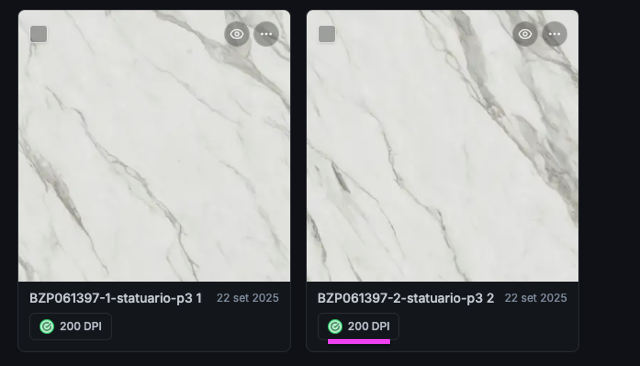
Just click on the badges to see available upscales, with status indication (in progress, completed, etc.).
📥 Download indicator for upscales
The download button now shows if a file has already been downloaded.
You can still download the upscale again.
Note: this information is saved locally in your browser and will not be available if you change device or browser.
📊 Upload and processing status monitoring
After uploading images, you can track the processing status on a new dedicated page.
You’ll find file names, upload author, and current status.
Once processing is complete, files will automatically appear in the archive.
🗑️ Deleting files from the archive
You can now delete images from the archive.
This operation is only successful if the images have not been used for model customization.
🔍 Inspect image origin
With the new “Inspect origin” option, you can see, for each image in the archive, the author and upload date.
📜 Infinite scroll
Goodbye pagination!
Lists of models, upscales, and generations now load dynamically as you scroll, for smoother and continuous navigation.
↩️ Improved “Back” button behavior
The “Back” button now takes you exactly to the previous page.
For example, if you open a project from a generation, going back will return you to the generation, not the project list.
🖼️ Images for custom models
We have linked models created before the introduction of reference images to their respective images, now visible on the platform.
🤝 Archive sharing between organizations
It is now possible to share images and custom models between multiple organizations.
For example, Tecnografica will be separate from Tecnografica Ibérica, but they will use the same archive.
🕐 Time in generations
The generations table now also shows the exact creation time.
September 2025
September 25, 2025
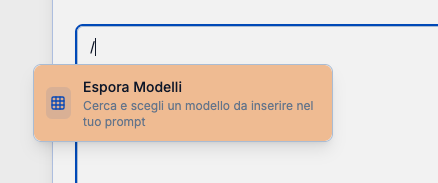
The first version of “Explore Models” is now available directly inside the prompt box.
Thanks to this new feature, you can mention models in two ways:
- with the classic @, using the suggestion system you’ve already become familiar with in recent weeks
- by typing / and pressing Enter or clicking on the “Explore Models” option
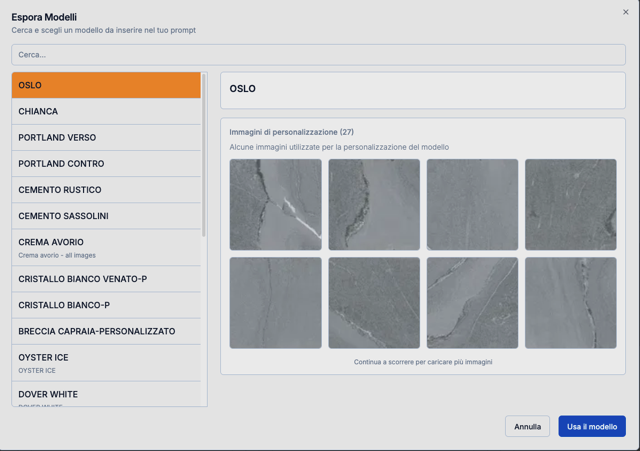
The new “Explore Models” section opens a dedicated panel that allows you to:
- quickly search available models
- scroll through the list
- view sample images for each selected model
By pressing Enter or clicking “Use model”, the panel will close automatically and the chosen model will be mentioned in the prompt.
September 22, 2025
The new “Prompt Templates” page is now available.
Within the Generations section, a dedicated page for creating prompt templates has been introduced.
Here you can set up predefined prompts for specific goals (for example, generating an alternative face).
Once created, the template can be loaded during generation using the button above the prompt field.
In the window that opens, you can select the models to include in the prompt body, which will then be loaded automatically.
September 10, 2025
New features are now available:
🔄 Request new images in a generation
On a generation’s page, there is now a new button at the top right that lets you request additional images without starting a new generation.
Example: if you requested 4 images and none satisfy you, you can generate 4 more directly from there.
As soon as they’re ready, your generation will show the new 4 images along with the previous ones!

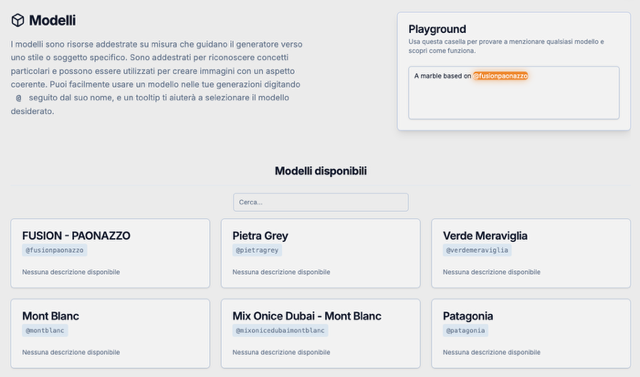
📖 Models page
A new Models page has been introduced, listing available models with their keys to use for @mentions in generation prompts.
In the coming days, we will add a brief description for each model.
📌 Note:
This page is regularly updated with the latest news and changes to the platform.